
A complete repair record
What You Can Do with JewelIntake
See how JewelIntake keeps each repair organised, from the first item description and condition photos to payments, signatures and customer receipts.
Follow the practical details of the Android repair workflow below. App screen details and labelled interface illustrations use sample jobs.
Booking in · Condition photos · Payments · Receipts · Job tracking · Backups
When the item arrives
Start the job while the customer is with you
Select an existing customer or add a new one without leaving the intake. JewelIntake checks phone numbers and email addresses for likely matches, helping staff avoid duplicate customer records while still allowing shared contact details.
The intake follows a clear sequence through item details, photos, quote and payment information, customer confirmation and the drop-off receipt. A job reference is created at the start. Save details as you move through intake; the app prompts you about unsaved changes when leaving the job header.
More than one item
Keep the handover together without losing the details
When a customer leaves more than one piece, each item can be recorded separately within the same repair job. This keeps the handover together without reducing several pieces to one vague description.
Jewellery item records can include:
- Item type and category
- Metal or material
- Stone details
- Size or measurement
- Declared value
- Existing condition
- Customer-reported issue
- Requested work
- Special instructions
Watch records include fields for brand, model, serial or reference number, strap type, battery requirements, water-resistance discussion and visible scratches or damage.
Condition photos
Keep the photos with the job
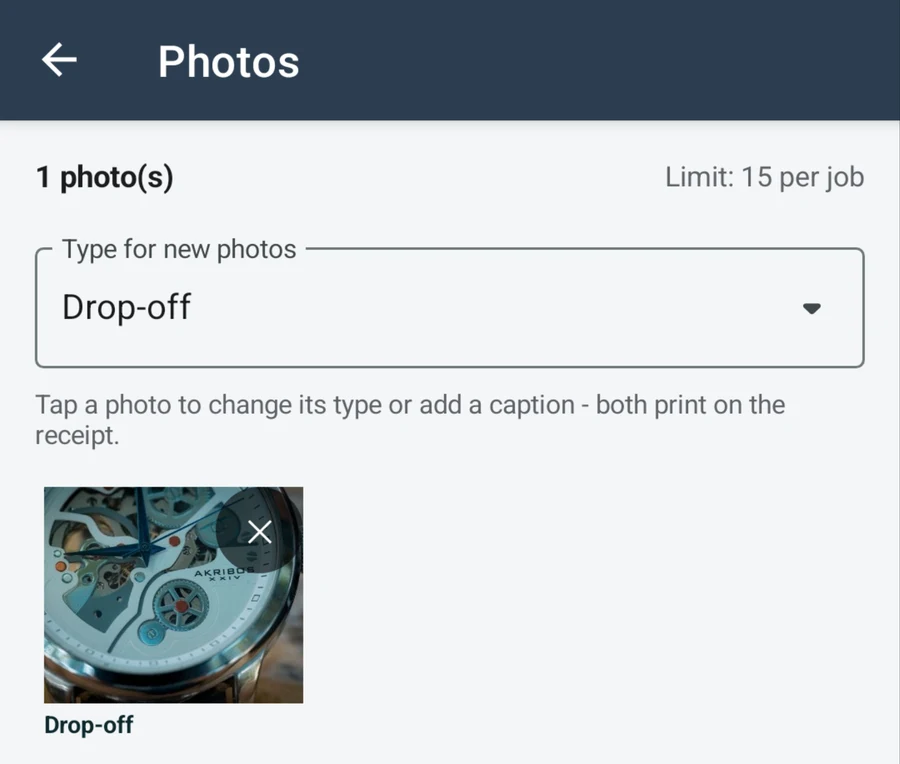
Take a photo in the app or choose an existing image from the device. Photos remain attached to the correct job and can be categorised as Drop-off, Damage or condition, During repair, Completed or Collection.
Add a caption when an image needs context. Categories and captions explain what each image shows. The photo category also determines which receipt it can appear on.
Free supports up to 3 photos per job. Pro supports up to 15 photos per job.
View larger screen detail — opens in a new tab ↗
Quotes and payments
See what has been paid and what is still owing
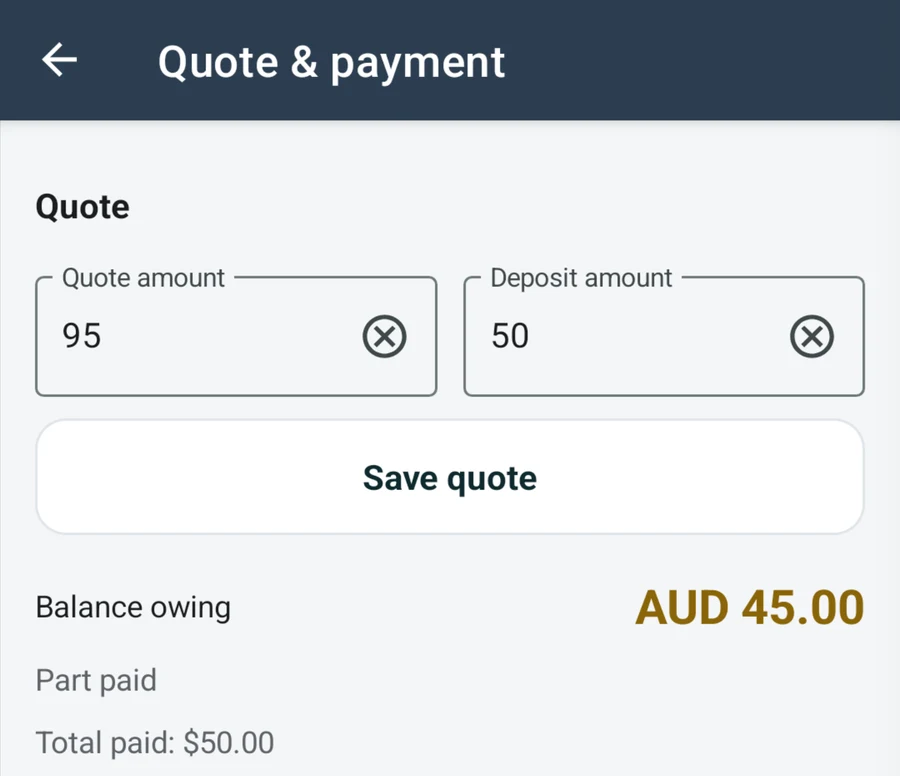
Enter the quote and deposit at intake, then add payments as the work progresses. JewelIntake supports deposits, progress payments, final payments and refunds, with payment methods for cash, card, bank transfer and other arrangements.
Every payment remains visible in the job history. If an entry is corrected or removed, the total paid, payment status and balance owing are recalculated automatically.
Businesses that record tax can show the relevant component on receipts using inclusive or exclusive quote settings. JewelIntake records payment information entered by the business. It does not process card transactions or replace accounting software.
View larger screen detail — opens in a new tab ↗
Receipts and signatures
Give the customer a clear record at both handovers
At drop-off, record the signer’s name and signature before generating the first PDF receipt. At collection, confirm the final payment position and capture the collection signature. Saving the collection signature marks the job as collected and opens the final receipt.
Drop-off and collection receipts can include business and customer details, job dates, every item, relevant photos, quotes, payment summaries, customer-facing notes and the signer’s name and signature.
Drop-off receipts use Drop-off and Damage or condition photos; collection receipts use Completed and Collection photos. Each PDF includes up to six photos, subject to the plan’s photo limit. During-repair photos remain in the job record.
Internal notes stay off customer receipts. Use customer-facing notes for information you want printed. Preview or regenerate the PDF from the latest job details, then share it through the device’s available apps.
Job progress
See where every repair is up to
Use Draft, Received, Quoted, Approved, In Repair, Ready for Collection, Collected and Cancelled statuses to show where each job stands. The dashboard gives staff a quick view of active jobs, work ready for collection and jobs collected during the month.
When a repair is ready, JewelIntake prepares a message with the customer name, item details, job reference and balance owing. The message opens in the device’s SMS app for review when a compatible SMS app is available.
If a collected repair needs more attention, the job can be reopened without creating a disconnected record.
Finding a job
Get back to the right record quickly
Search customer records by name or phone number. Customer profiles keep contact details, address, notes and repair history together.
Pro also includes repair job search by customer name, phone number or job reference. Operational filters help staff find jobs by status, collection readiness and balance owing.
Local storage
Keep your working records on the device
JewelIntake stores repair records, photos, signatures and generated PDFs locally on one Android device. There are no staff accounts or multi-device synchronisation. The app does not require a JewelIntake cloud account or automatically upload repair records to a hosted business database.
Pro users can create a full ZIP backup of the local records and files, and export job information to CSV. A compatible backup can still be restored after a Pro subscription ends, although creating new ZIP backups and CSV exports requires Pro. Backups are manual: save an external copy before uninstalling or replacing the device. Follow the backup instructions.
The core repair workflow works without a constant internet connection. Purchases, restoring purchases and periodic Pro verification require access to Google Play.
Getting started
Choose the capacity that fits your repair book
Try the intake-to-collection workflow free with up to 10 active jobs and 3 photos per job.
For a busier repair book, Pro adds unlimited active jobs, more photos and the extra tools described above. Compare Free and Pro.
Looking for a focused overview? See jewellery repair software or watch repair software.
Android only · Australia
No trial deadline